Invisible Space — Copy and Paste for Free in 2026
Atualizado em:
What is an invisible space?
The invisible space is a Unicode character that doesn’t appear on the screen but is recognized as valid text by apps and games. Use it to create an invisible nickname in Free Fire , send empty messages on WhatsApp , leave your name blank on Instagram and TikTok , and much more. Copy it with one click below — free, no registration required, works on iPhone and Android.
An invisible space (also called an invisible character or invisible letter ) is a symbol in the Unicode standard that occupies space in text without appearing visually. The most commonly used is U+3164 (Hangul Filler) , originally created for the Korean alphabet and adopted globally by gamers and social media users.
Unlike regular keyboard space, it’s not filtered by games and applications — the system reads it as valid text, but doesn’t render anything on the screen. That’s why it works where regular space is blocked.
How to use the invisible space in Free Fire
Free Fire doesn’t allow normal spaces between nickname letters. With the invisible character, you can create visual separation or a completely blank nickname .
- Copy the invisible space using the buttons above.
- Open Free Fire and tap on your nickname in the upper left corner.
- Tap the name edit icon.
- Type the desired name and paste the character where you want the space — or paste only the character for an invisible nickname.
- Please confirm . The change costs 800 diamonds or a Nickname Change Card.
Copy and Paste the Invisible Character
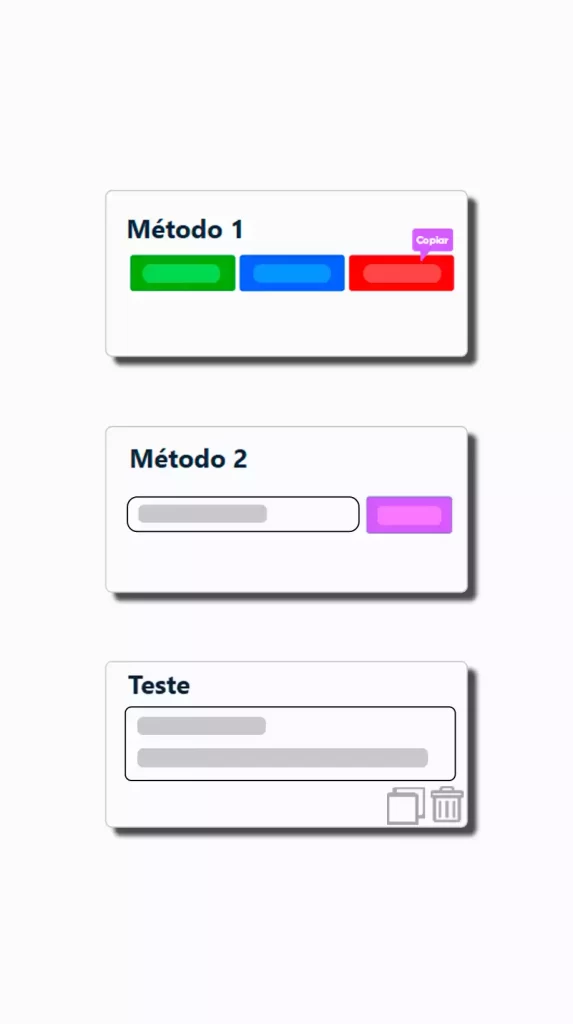
Our invisible space tool can generate empty characters completely free of charge. Creating these blank texts is the easiest way to paste an invisible character. All you need to do is click on any of the buttons and paste to use wherever you want. Furthermore, you can generate unlimited invisible characters with our invisible text generator.
Additional Tool Features
Our invisible text generator is constantly being updated to bring more practicality and control to its users. The latest updates make the tool even more complete and versatile. Check it out:
Easy to use
Multiple Methods
The interface was designed to be simple and intuitive. Even those who have never used this type of generator can navigate it without difficulty. The buttons are clearly identified and the instructions are straightforward, allowing you to create invisible characters in just a few clicks.
You can choose between three different ways to generate white space. This offers flexibility to adapt its use to your needs, ensuring a practical and personalized experience.
Why use our Invisible Space tool?
With the help of our Invisible Character , you can create invisible text ( ) in a simple and effective way. This functionality is possible thanks to a series of unique features that make the tool indispensable for various situations. Check out the main features that facilitate the use of the invisible character below:
Copy and Paste Option (Blank Space)
Our invisible character generator allows you to easily create and use whitespace. You can quickly copy it by clicking the “Copy” button or by selecting the character and using the shortcut Ctrl + C. This makes it easy to adapt its use to your needs.
Unlimited Generation of Invisible Spaces
If you need multiple characters at once, the “Method 2” feature allows you to define exactly how many spaces you want to generate. This is useful for those who need longer sequences or multiple spaces in a single use.
Free to Use
The tool is completely free. There are no fees, hidden limitations, or restrictions on access to the available features.
100% Online, No Installation Required
Everything happens directly in the browser, without the need to download or install any programs.
Quick Character Test
To check if the whitespace was copied correctly, there is a test area. Paste the character there and verify that everything works as expected before using it in the final destination.
Where Can You Use the Invisible Space?
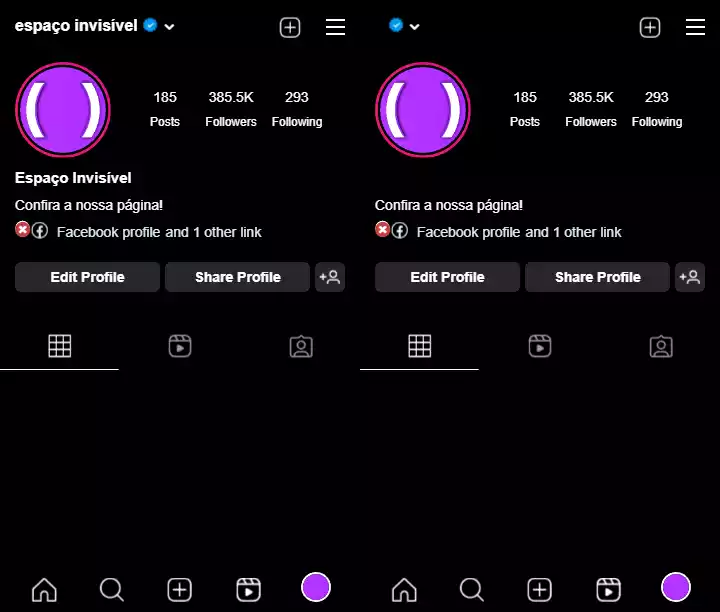
Invisible text can be used for various purposes. Some of the main ones include:
Text Messages
One of the most fun ways to use invisible characters is to send funny, blank messages to your friends and family. These blank spaces can be copied and pasted into any messaging app, allowing you to send an “invisible message” without any hassle.
Social Media Profiles
Platforms like Instagram , WhatsApp , TikTok , Facebook, Discord, Twitter, online forms, and others allow you to use these special characters to give your profile a unique touch. Experiment and transform your profile into something truly mysterious and original !
Nicknames and Names in Games
Similarly, invisible characters can be used to create usernames for your game profiles, such as in Free Fire , Fortnite , PUBG, and Roblox . Imagine having a name that seems not to exist, yet is unique and catches the attention of other players. This is a creative way to stand out on gaming platforms like Steam, Xbox Live, PlayStation Network, or any other service that allows profile customization.
For Privacy Purposes
They can also be an excellent tool for protecting your online privacy . For example, when filling out online forms that require personal information, such as your address, you can use these spaces to fill in required fields without revealing sensitive data.
Which invisible character to use in 2026?
There are over 60 Unicode characters classified as invisible, but only a few work reliably on major platforms. The two most recommended are:
| Unicode | Name | Free Fire | TikTok | ||
|---|---|---|---|---|---|
| U+3164 | Hangul Filler (ㅤ) | ✅ | ✅ | ✅ | ✅ |
| U+2800 | Padrão Braille (⠀) | ✅ | ✅ | ✅ | ✅ |
| U+200B | Largura zero | ⚠️ | ⚠️ | ⚠️ | ⚠️ |
| U+00A0 | Espaço sem quebra | ❌ | ❌ | ❌ | ❌ |
If U+3164 stops working after an update, use U+2800 as a replacement. All characters are available in the complete table below the tool.
Frequently Asked Questions
How many invisible characters exist?
In fact, the number of invisible characters , also known as “zero-width characters ,” is greater than the estimated 20. They play specific roles in text formatting, absorption, and layout. They are used to create subtle visual effects , control how characters behave, and experience the presentation of text . Check out more on the Wikipedia page .
| Unicode | Description | HTML | Example |
|---|---|---|---|
| U+0020 | Space |   | [ ] |
| U+00A0 | Unbroken space | | [ ] |
| U+2000 | A Quad |   | [ ] |
| U+2001 | In Quad |   | [ ] |
| U+2002 | In space |   | [ ] |
| U+2004 | Space of three by in |   | [ ] |
| U+2005 | Four by one space |   | [ ] |
| U+2006 | Six by one space |   | [ ] |
| U+2007 | Figure Space |   | [ ] |
| U+2008 | Punctuation space |   | [ ] |
| U+2009 | Thin Space |   | [ ] |
| U+200A | Hair space |   | [ ] |
| U+2028 | Line separator | 
 | [ ] |
| U+205F | Average mathematical space |   | [ ] |
| U+3000 | Ideographic Space |   | [ ] |
| U+2003 | Space In |   | [ ] |
| U+0009 | Horizontal guide | 	 | [ ] |
| U+000A | Line feed | | [ ] |
| U+000C | Form feed |  | [ ] |
| U+001C | File separator |  | [ ] |
| U+200B | Zero width space | ​ | [] |
| U+200C | Non-zero width joiner | ‌ | [] |
| U+2060 | Word joiner | ⁠ | [] |
| U+2061 | Word separator | ⁡ | [] |
| U+2062 | Paragraph separator | ⁢ | [] |
| U+00AD | Soft hyphen | ­ | [] |
| U+034F | Combining Grapheme Joiner | ͏ | [] |
| U+061C | Arabic letter mark | ؜ | [] |
| U+115F | Hangul Choseong Filling | ᅟ | [ᅟ ] |
| U+1160 | Hangul Jungseong Filler | ᅠ | [ᅠ] |
| U+17B4 | Khmer Vowel Inherent Aq | ឴ | [឴ ] |
| U+17B5 | Khmer Vowel Inherent Aa | ឵ | [឵ ] |
| U+180B | FVS1 | ᠋ | [᠋ ] |
| U+180C | FVS2 | ᠌ | [᠌ ] |
| U+180D | FVS3 | ᠍ | [᠍ ] |
| U+180E | MVS | ᠎ | [ ] |
| U+200D | Zero Width Slotter | ‍ | [ ] |
| U+200E | Mark from left to right | ‎ | [ ] |
| U+200F | Mark from right to left | ‏ | [ ] |
| U+202A | Left-to-right embedding | ‪ | [ ] |
| U+202B | RLE | ‫ | [ ] |
| U+202C | Directional pop formatting | ‬ | [ ] |
| U+202D | Left to right substitution | ‭ | [ ] |
| U+202E | Right-to-left substitution | ‮ | [ ] |
| U+202F | Narrow, gapless space |   | [ ] |
| U+2063 | Invisible separator | ⁣ | [ ] |
| U+2064 | Invisible Plus | ⁤ | [ ] |
| U+2066 | LRI | ⁦ | [ ] |
| U+2066 | LRI | | [ ] |
| U+2067 | RLI | | [ ] |
| U+2068 | FSI | ⁨ | [ ] |
| U+2069 | Directional pop isolation | ⁩ | [ ] |
| U+206A | Inhibit symmetric exchange |  | [ ] |
| U+2800 | Blank Braille Pattern | ⠀ | [⠀ ] |
| U+206B | Enable symmetric exchange |  | [ ] |
| U+206C | Inhibition of modeling of the Arabic form |  | [ ] |
| U+206D | Enable Arabic shape modeling |  | [ ] |
| U+206E | National digit shapes |  | [ ] |
| U+206F | Nominal digit shapes |  | [ ] |
| U+2800 | Blank Braille Pattern | ⠀ | [⠀ ] |
| U+3164 | Hangul Filler | ㅤ | [ㅤ ] |
| U+FE00 | Variation selector-1 | ︀ | [︀ ] |
| U+FE01 | Variation selector-2 | ︁ | [︁ ] |
| U+FE02 | Variation selector-3 | ︂ | [︂ ] |
| U+FE03 | Variation Selector-4 | ︃ | [︃ ] |
| U+FE04 | Variation Selector-5 | ︄ | [︄ ] |
| U+FE05 | Variation selector-6 | ︅ | [︅ ] |
| U+FE06 | Variation Selector-7 | ︆ | [︆ ] |
| U+FE07 | Variation Selector-8 | ︇ | [︇ ] |
| U+FE08 | Variation Selector-9 | ︈ | [︈ ] |
| U+FE09 | Variation Selector-10 | ︉ | [︉ ] |
| U+FE0A | Variation Selector-11 | ︊ | [︊ ] |
| U+FE0B | Variation Selector-12 | ︋ | [︋ ] |
| U+FE0C | Variation Selector-13 | ︌ | [︌ ] |
| U+FE0D | Variation Selector-14 | ︍ | [︍ ] |
| U+FE0E | Variation Selector-15 | ︎ | [︎ ] |
| U+FE0F | Variation Selector-16 | ️ | [️ ] |
| U+FEFF | Zero-width non-breaking space |  | [ ] |
| U+E0001 | Language label | 󠀁 | [ ] |
| U+E0020 | Space for labels | 󠀢 | [ ] |
| U+E0021 | TAG EXCLAMATION MARK | 󠀣 | [ ] |
| U+E0022 | TAG ASHF | 󠀤 | [ ] |
| U+E0023 | TAG NUMBER SIGN | 󠀥 | [ ] |
| U+E0024 | DOLLAR SIGN TAG | 󠀦 | [ ] |
| U+E0025 | TAG PERCENTAGE SIGN | 󠀧 | [ ] |
| U+E0026 | Day Ampersand | 󠀨 | [ ] |
| U+E0027 | TAG APOSTROFIA | 󠀩 | [ ] |
| U+E0028 | TAG LEFT PARENTHESIS | 󠀪 | [ ] |
| U+E0029 | TAG RIGHT PARENTHESIS | 󠀫 | [ ] |
| U+E002A | TAG ASTERISK | 󠀬 | [ ] |
| U+E002B | SIGNAL DE TAG PLUS | 󠀭 | [ ] |
| U+E002C | TAG COMMA | 󠀮 | [ ] |
| U+E002D | HYPHEN-MINUS TAG | 󠀯 | [ ] |
| U+E002E | Tag Full Stop | 󠀰 | [ ] |
| U+E002F | Solidus Label | 󠀱 | [ ] |
| U+E0030 | TAG DIGIT ZERO | 󠀲 | [ ] |
How many invisible characters are there?
The Unicode standard defines over 60 characters classified as invisible or zero-width. Each has a specific formatting function. The most compatible with games and social networks in 2026 are U+3164 (Hangul Filler) and U+2800 (Blank Braille Standard). See them all in the table above.
Does invisible space work on iPhone?
Yes. The U+3164 is compatible with iOS and works normally in Safari and all apps on the App Store. If an app doesn’t accept it, try the U+2800 as an alternative. Avoid the U+200B on iPhone as it may not work with some games.
Is invisible space safe?
Yes. It’s a standard Unicode character, recognized internationally. It doesn’t contain malicious code, it’s not a hack, and it doesn’t violate the terms of use of WhatsApp, Instagram, TikTok, or Free Fire. Millions of users use it daily without any consequences.
What is the difference between invisible spacing and spaced font?
Invisible space is a Unicode character that doesn’t appear visually at all. Spaced fonts—like bold or italicized Unicode-generated letters—have a different visual style, but the characters still appear on the screen. They are distinct features.
Why didn’t the invisible space feature work on my device?
The most common problem is that the character was not copied correctly. Try again by clicking the copy button on this page and paste it immediately, without switching applications first. If the problem persists, use Method 2 to generate a single character and copy it manually.
Can I use the invisible space on WhatsApp to send an empty message?
Yes. Paste the character into the message field and tap send. The message will be delivered without any visible text. See the complete step-by-step instructions at invisible space for WhatsApp.
How to leave a blank name on Instagram with an invisible space?
Copy the character, go to Edit Profile on Instagram, delete the current name, paste the invisible space, and save. The profile name will then be completely blank. See the full guide on invisible spaces for Instagram.